The past year of remote work poured accelerant on many workplace trends, including flexible work, collaborative platforms like Microsoft Teams, and fully remote meetings. Less remarked upon is another trend, which has been quietly creeping along for years now: the death of the hard copy.
When I started in the A/E/C industry five years ago, hard copy submissions were standard practice. RFP/Qs that also requested a digital copy often asked for it on a flash drive—kind of missing the point?—and the rare RFP/Q that only requested a digital copy typically required it to be uploaded onto a password-protected FTP site or Dropbox folder. Only around four times in as many years do I recall an RFP/Q simply asking for an email with the submission attached.
Oh, how a pandemic changes things.
With so many offices working fully remote (including clients’ offices), the requirement of hard copy submissions began to look like a pretty antiquated practice.
I couldn’t be happier about it. Not only am I all for the environmental impact of going “paper-less,” I’m all for removing that final and least fun part of the process—where, with sweating brow and paper-cut fingers—I punch and bind a dozen 100-page hard copies, discover a typo on page 47, unbind the copies, shuffle in a corrected page 47, re-bind, and then shove the completed submissions into a FedEx box, and rush to the nearest drop-off location before the next-day delivery window closes. Not my favorite part of the process.
But the death of the hard copy, and the embrace of the digital one, means a couple of things for me and others in my role across the A/E/C industry—those who oversee the submission of qualifications, proposals, bids, and other competitive documents. There are a few critical rules of thumb we will need to embrace in our (hopefully) more digital world.
We need to feel as anxious about digital copies as we do about hard copies.
Look back even 25 years ago, and leaving a typo in an office-wide memo would have been an unthinkable offense. Today, typos merit not even a raised eyebrow, given the ocean of email and other digital communications we are collectively drowning in. Many people—business leaders among them!—even alter their email signatures to preemptively ask recipients to “excuse the typos” with the nominal excuse that the email was sent from their phones.
Digitally, we inhabit a first draft mindset. This has its pros, including efficiency and the free flow of information, but it also has a major con: it discourages our inner editors.
Looking beyond the merits of editing to improve sentence structure and
Sometimes, a typo is all that stands between a submitting firm and the client’s shortlist.
No way to kill your client’s confidence in your firm as a design partner claiming, say, a “thorough quality control process” than a careless typo in the cover letter. If that’s the mistake they make in the proposal, what kind of mistakes will be in the construction documents?
But even if the client is forgiving, a typo still communicates something. A typo is the typographic equivalent of showing up late for an interview—the client may understand (and even really mean it!) but they will notice, and it will influence their decision.
My issue with digital copies? I’m convinced there are more typos in them. Lots more.
As much of a pedant as I can be when it comes to grammar and typos and such, I have been ashamed to discover some pretty egregious typos in my own work (“architetcrue,” anyone?) and, worse, in proposals that had already been submitted, living in dreaded facsimile as PDFs in my Outlook Sent folder, un-take-back-able.
This is where hard copies can help. For—as much as I hate seeing that typo on page 47—I’m always glad to catch it, that it was me and not the client. I can’t speak for everyone—but I know that I proofread something printed on paper far, far better than something viewed on a screen.
I can’t articulate the exact how and why of this—there’s a great overview of reading on screen as compared with print in the Scientific American from several years ago—but I know it to be the case. Once something has been printed, there’s a finality to it, something more real. And that realness means that I take it a little more seriously than when it’s just a PDF attachment to a hastily written thank-you-for-the-opportunity email. (It’s worth pointing out here that I’ve actually forgotten to attach the proposal file before, which says something.)
So, while the ideal perspective is that a “proposal is a proposal is a proposal” and that a digital copy is just as “real” as any hard copy…digital proposals end up feeling less important.
For me, the impending “death” of hard copies will require a shift in thinking, an attempt to incorporate those sweaty, nervous palms that are part of printing, binding, and shipping, into the less rigorous process of exporting a PDF from InDesign.
Our digital submissions are just hard copies in disguise.
This is a problem that’s dogged me for years—the dimensions of a typical laptop screen or computer monitor do not play well with the digital PDFs we are often looking at. The dimensions of a typical proposal designed for print is letter (8.5 x 11″) or tabloid (17 x 11″) pages, often arranged as a book into spreads. The dimensions of a typical computer screen are 16×9.
But the numbers are besides the point—we all know that reading PDFs on our computer screens (or our phones!) is an abysmal experience.
This friction isn’t easily resolved, either. Many clients will continue to expect standard page size documents because some readers may want to print them out. So, if the paradigm we work in continues to value the possibility of the hard copy, then we’re stuck where we are, with documents that don’t play well with screens.
One solution I’ve stumbled upon—keep in mind that I’m not a graphic designer by trade!—is to leverage InDesign’s Alternate Layouts or Liquid Layouts tools. While in theory these tools would solve this digital/print friction, in practice they require some pretty advanced InDesign chops…that I don’t have. Plus, they would require excessive tinkering with existing templates and RFP/Q submission workflows.
After some digging, it appears that there are proposal tools out there that allow you to churn out proposal documents in a variety of formats, but you lose much of InDesign’s inherent flexibility.
We have more time and/or money.
Whether you print your submissions by hand like me, or send them off to a printer (like I used to do!), you have more time and/or money on your hands when submitting a digital submission.
What to do with that extra time?
Put it back into the proposal.
There’s a concept I really like—which I first encountered in the Ballast ARE 5 Review Manual, of all places—that frames the relation of time to perfection.
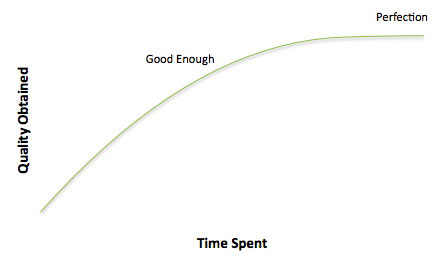
Now, there’s a lot I could say about this graph—a separate post to come soon!—but the important takeaway here is that some print proposals never make it past “Good Enough” on the chart above. That extra push to “Perfection”? That is where some of our newfound time in our hard-copy-less future should go.
And the money spent on printing? Don’t count that as savings to your budget. Reallocate that investment! More project photography, more photos of your staff, primary research, team-building activities. My goals as a marketer is never to save for savings’ sake—it should be to save on certain line items in order to add other “wish-list” items.

 Taylor Coe